
Most artwork goes out with a covering email that took thirty seconds to write, and most approval trouble starts there. "Have a look and let me know" invites a reply that says "looks good" — which reads like a yes, arrives four days later, and does not say which file it is about.
Below are four templates you can copy: sending the first proof, following up on silence, sending a revision, and getting a verbal yes onto the record. They are written to be plain rather than clever, because the reader is a busy customer who is not thinking about your production schedule.
What an approval email actually has to do
Before the wording, the job. A proof email that works does five things:
- Names the file it is about, including a version number. Not "the design" —
bloom-spring-menu-v2.pdf. - Asks for one of two answers, approve or changes, so a reply cannot be ambiguous by accident.
- Says what happens next, in your words: what you will do with a yes, and how long changes will take.
- Gives a deadline with a consequence. "By Thursday" travels; "as soon as you can" does not.
- Tells them what to check, briefly. Customers proofread copy and ignore bleed, sizes and colour, because nobody told them those were theirs to confirm.
What none of it settles is what kind of proof you sent. A PDF on a screen can prove content, layout and page order, and cannot prove colour — a separate conversation, and the one that turns into an argument at handover. What a print proof is covers the six kinds and what each of them actually proves.
Template 1 — sending the first proof
Subject: Proof for approval — Spring menu (v1), please reply by Thu 21 Aug

Hi Anna,

Your proof is attached: bloom-spring-menu-v1.pdf. Please have a look and
reply with either:

  APPROVED — and I'll send it to press as it is, or
  CHANGES — with what needs to move.

Worth checking while you're there:
  · spelling of names and prices
  · phone number and opening hours
  · anything that has to sit inside the trim (nothing important within 3 mm
    of the edge)

If you can reply by Thursday 21 August we'll still make the delivery date
we discussed. After that the schedule moves by about a week.

Colours on screen are a guide rather than a print match — if colour is
critical for this job, say so and I'll send a printed proof.

Thanks,
Sam
Northgate Press
Two things do the work there. Asking for one of two literal words gives you a reply you can file, and stating what happens after the deadline makes the deadline real without nagging.
Template 2 — the follow-up when nothing comes back
The first follow-up should assume the email was missed, not ignored. It usually was.
Subject: Still need your approval — Spring menu (v1)

Hi Anna,

Just checking this one reached you — I sent the proof for the spring menu
on Monday and haven't heard back, and I'd rather chase you than print the
wrong thing.

Nothing to write if it's fine: reply APPROVED and I'll get it moving.

If the timing has changed on your side, tell me and I'll hold the slot.
The press date we discussed needs your yes by Thursday.

Thanks,
Sam
Do not attach the file again unless they ask. A second attachment creates a second copy in their inbox, and the wrong copy is what they will open in a fortnight.
Template 3 — sending a revision
The most common way a shop prints the wrong file is a revision that looked like the previous email.
Subject: Revised proof — Spring menu (v2, replaces v1)

Hi Anna,

New version attached: bloom-spring-menu-v2.pdf. Please work from this one
and ignore v1.

What changed since the last proof:
  · Honey Oat Latte price now 4.90
  · opening hours moved to the back page
  · "Sencha Green" spelling fixed

Everything else is unchanged. Same two answers as before: APPROVED, or
CHANGES with what's still wrong.

Thanks,
Sam
Listing what changed is not politeness. It tells the customer what to re-read, and it gives you something to point at later if a dispute is about whether a change was made.
Template 4 — putting a verbal yes in writing
Half of all approvals arrive by phone, over a counter, or as "yeah that's great" in a chat window. Those are real approvals, and they are worth nothing in a dispute unless somebody writes them down. Send this immediately, while the conversation is still fresh.
Subject: Confirming your approval — Spring menu (v2)

Hi Anna,

Confirming what we agreed on the phone just now: you approved
bloom-spring-menu-v2.pdf (version 2) for production, today at 14:20.

I'm scheduling it on that basis. If anything about that is not right,
reply within the next hour and I'll stop it.

Thanks,
Sam
The hour is doing something specific: it turns your silence-is-consent assumption into a stated one, which is a far better position than remembering a phone call.
When you need a form rather than an email
"Artwork approval form" and "proof approval email template" describe two halves of the same job, and it is worth knowing which one you actually want.
An email is right when the approver is one person who will reply in a sentence. Everything above is that.
A form is right when several people look, when the same fields have to be checked every time, or when the sign-off gets filed with the job bag. The fields it needs — the file and its version, what to check, a decision naming the version, a name and a date — are laid out ready to paste in our client feedback form templates, including a production version headed proof approval.
The one thing neither format fixes: a form emailed as an attachment is a second file to open, and on a phone it is a second file not to open. Put the fields in the message body.
The three things an email cannot do
Templates fix the wording. They do not fix the medium, and there are three jobs no email will ever do for you.
Bind the approval to a file. "Approved" in a reply refers to whatever was attached to the email the customer thinks they are replying to. When a job has been through three rounds, the thread contains three PDFs with similar names, and the yes belongs to whichever one they had open.
Prove what was approved. A forwarded chain is not evidence — it is a story that can be edited on the way past. When a customer says "that is not what I signed off", an inbox does not settle it.
Tell you whether they even looked. Read receipts are refused more often than granted, and a customer who has not opened the file cannot be distinguished from one who has and is thinking about it. So you chase people who are not late and stay quiet with the ones who are.
What we do instead
This is our own tool, so treat the next paragraph accordingly.
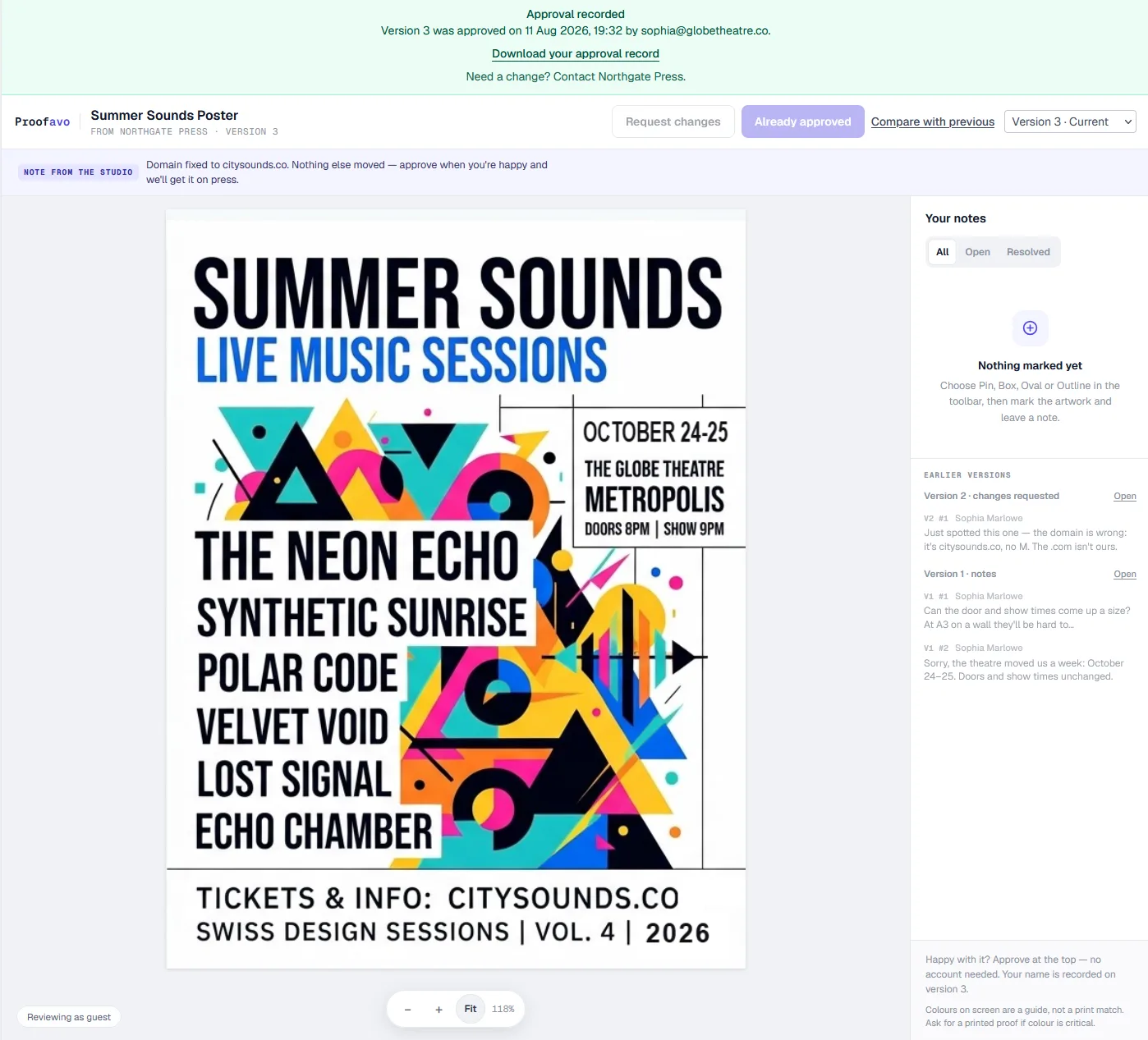
Proofavo replaces the attachment with one link. Your customer opens it — no account, no login, no app — sees the artwork with one Approve button and one Request changes button, and their comments land as pins on the artwork itself rather than as "move the logo up a bit" in a reply.
The three jobs above then get done by the system rather than by your memory: an approval is recorded against the exact, immutable version and produces a downloadable record with a SHA-256 fingerprint of the approved file; the shop's dashboard shows Not opened yet until the customer actually opens the link; and when a yes does arrive by phone, you can record it on their behalf with the channel noted, so it lands on the same record instead of in a notebook.
Template 4 stays useful even then — as the email you send after recording it.